Getting the Most Out of Your PDF Manual: A Complete Guide
So, you've downloaded your PDF manual—what's next? To make the most of your manual and enjoy a smooth reading experience, we recommend using Adobe Acrobat Reader. Here's a step-by-step guide to getting started and using the features of your PDF manual effectively.
Step 1: Download Adobe Acrobat Reader
If you don't already have Adobe Acrobat Reader installed on your device, here's how to get it:
- For Windows users: Click here to start downloading Adobe Acrobat Reader for Windows.
- For macOS users: Click here to start downloading Adobe Acrobat Reader for macOS.
After the download completes, open the Adobe Acrobat Reader install file and follow the prompts to install the program.
Step 2: Open Your PDF Manual
With Adobe Acrobat Reader installed, you're now ready to open your PDF manual. Simply locate the PDF file on your device, right-click on it, and select "Open with Adobe Acrobat Reader."
Navigating Your PDF Manual
One of the great things about PDF manuals is the ease of navigation. Most of our PDF manuals come with bookmarks, making it easy to jump to specific sections. To access these, click on the sidebar to open the bookmarks. This will display an index or table of contents for your manual, as shown in the example image below.
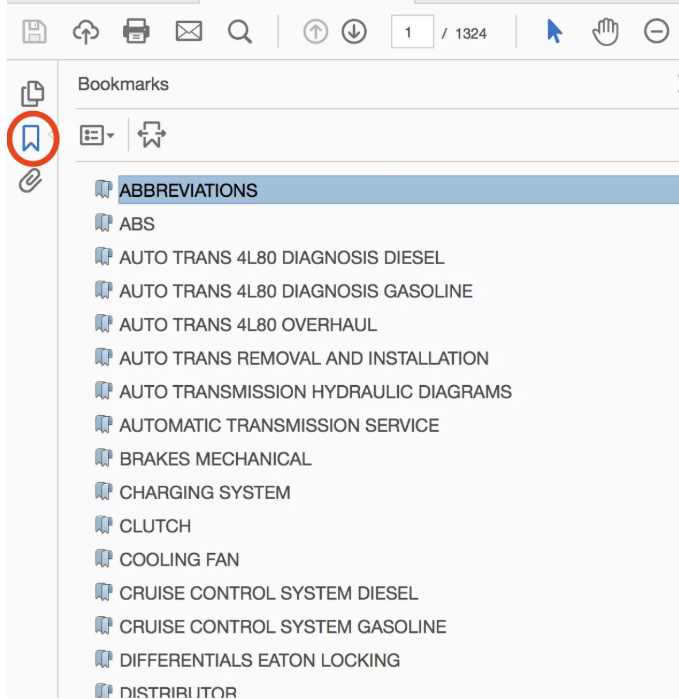
Note: While most of our manuals include bookmarks, there may be some exceptions.
View Your PDF Manual Online
Don't want to download the manual? No problem! You can also view your PDF manuals online through your 'My Account' page on our website. This gives you the flexibility to access your manuals from any device with an internet connection—without needing to download them.
Your PDF manual onto your smartphone or tablet
Did you know you can also download your PDF manual to your smartphone or tablet for quick, convenient access on the go? Check out our guide on How to Download a PDF Manual onto Your Smartphone or Tablet for step-by-step instructions.
Need Help? We're Here for You
If you encounter any issues while downloading Adobe Acrobat Reader or accessing your PDF manual, don't hesitate to contact us. Our customer support team is always ready to help you resolve any problems and ensure you get the most out of your manual.
Was this article helpful?
That’s Great!
Thank you for your feedback
Sorry! We couldn't be helpful
Thank you for your feedback
Feedback sent
We appreciate your effort and will try to fix the article